


I spent time using Shake Shack as a practical food-ordering companion rather than treating it like a simple menu viewer. It is a free Food & Drink app from Shake Shack that brings ordering, delivery, offers, and in-app challenges together in one place. That combination makes it more useful for someone who already visits Shake Shack than for a casual diner who only wants to browse once.
The first thing worth clarifying is the cost. Downloading and using the app is free, and its age rating is Everyone. That makes it easy to try without committing money to the app itself. Your food order is a separate purchase decision, of course, so I judge the app mainly by whether it makes that purchase easier, faster, or more worthwhile than ordering through a browser or walking up to the counter.
Its popularity also suggests that it has found a regular audience: the app has passed one million installs, with an average rating of 4.1 from roughly seventeen thousand ratings. I would not read that as proof that every ordering experience will be smooth, but it does indicate that this is an established mobile tool rather than a barely used experiment.
How the app fits into an actual Shake Shack visit
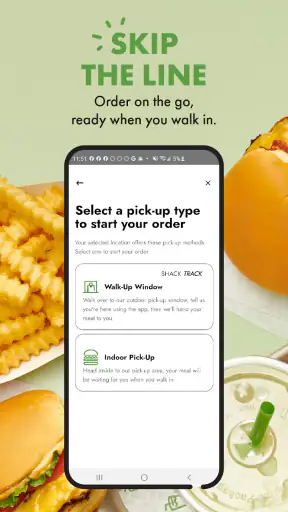
The strongest part of the experience is the way it supports different ordering situations. If I am already near a restaurant, skipping the line can be more convenient than standing at the counter and deciding under pressure. If I am at home, delivery gives the app a different purpose. And if I am simply checking whether there is a worthwhile offer, the app can be opened before I decide what to eat.
That flexibility matters because these are not identical needs. A person picking up lunch during a short break wants speed and a clear handoff. Someone ordering dinner for a household cares more about reviewing the basket carefully before placing it. The app is most convincing when I use it as a planning tool: I can look through the choices, make decisions before reaching the restaurant, and avoid turning the queue into my decision-making space.
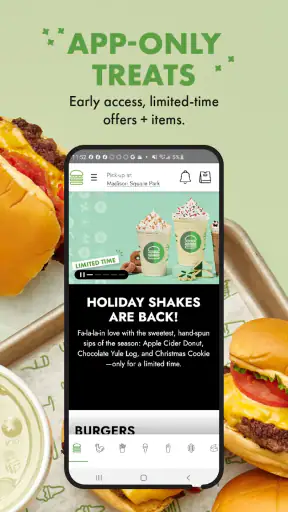
The developer, Shake Shack, has also built in exclusive offers and challenges. Those additions give the app a reason to remain installed between visits. In my view, this is more useful than a purely digital menu because the app can potentially influence when I order, not merely record an order I had already decided to make.
Still, I would not install it just because every restaurant app is expected to have a place on my phone. The benefit depends on how often I eat at Shake Shack and whether I value mobile ordering. If I visit only once in a long while, the free download is harmless, but it may not earn permanent space on my home screen.
Ordering ahead is better when the timing is predictable
For a routine pickup, ordering ahead can remove one of the most annoying parts of a popular fast-casual visit: waiting while the order is entered. I found the workflow most useful when I already knew roughly when I would arrive. That lets the app serve a specific purpose instead of becoming another screen where I place an order too early and then wait around.
My practical tip is to treat the pickup time as part of the meal plan, not as a promise that the food will be ideal whenever I happen to appear. If my schedule is uncertain, ordering at the last possible sensible moment is safer than placing an order while I am still far away. This is a small habit, but it avoids turning the convenience of skipping the line into a timing problem.
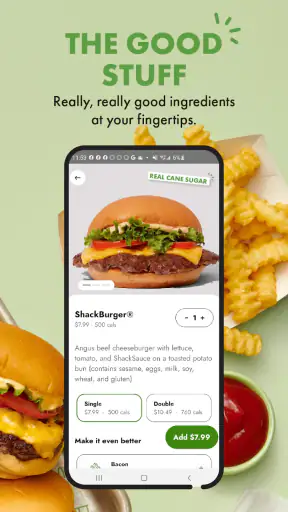
The app is also helpful for people who dislike making choices at the counter. I can review the menu in a calmer setting, consider the total, and make sure I have selected what I actually want before committing. That is particularly useful when ordering for more than one person, because a quick counter conversation can make it easy to overlook a modification or choose the wrong item.
Delivery changes the value calculation
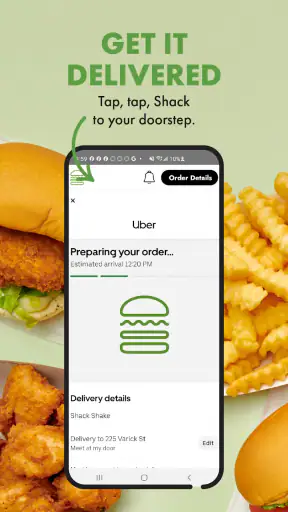
Delivery is convenient, but convenience should not automatically be confused with better value. The free app gives access to the ordering channel; it does not mean the delivered meal costs the same as collecting it yourself. Any person deciding between delivery and pickup should compare the final checkout total and the practical cost of leaving home, rather than assuming the app makes delivery inexpensive.
I see delivery as the right choice for a night when travel is genuinely inconvenient, when several people are ordering together, or when the time saved matters more than minimizing the total. Pickup is a better fit when I am already nearby or when I want more control over the timing. That distinction is important because the app makes both options feel similarly easy even though they serve different budgets and schedules.
For a group order, I would review the basket slowly before submitting it. Mobile ordering reduces conversation with staff, which is convenient, but it also means I need to catch mistakes myself. Checking the selected items, quantities, and destination before confirming is one of the most useful habits I developed with the app. The screen can make an order feel finished before I have really verified it.
Offers and challenges are useful only if they change your behavior
Exclusive offers are one of the clearest reasons to keep the app installed. They can make the free download feel more valuable when I was already planning a Shake Shack meal. However, an offer is not automatically a saving if it persuades me to order something I would not otherwise have bought. I judge these promotions by the final amount I would have spent without them, not by the excitement of seeing a deal in the app.
The same logic applies to the challenges. They add a light engagement layer around visits and orders, which may appeal to regular customers who enjoy having another reason to open the app. I would not choose the app solely for that element, but it gives habitual customers something beyond the basic transaction. The trade-off is attention: if I start checking the app mainly to chase a challenge, the feature may encourage extra purchases rather than simply rewarding meals I already intended to buy.
A good personal rule is to check offers before deciding, then choose the meal based on what I actually want. That keeps the promotion in its proper role. It can improve the value of an existing order, but it should not become the reason I spend money on an unnecessary one.
What feels better than the usual alternatives
Compared with joining a physical queue, the app gives me more control before I arrive. I can make decisions away from the noise of the restaurant and use pickup when that suits my route. Compared with opening a general delivery service, the direct Shake Shack experience is more focused: I am dealing with the restaurant’s own ordering environment rather than searching through a broader marketplace.
That focus is also the app’s limitation. A general delivery service may be more convenient when I am comparing several restaurants, building one order from different options, or trying to coordinate food from places other than Shake Shack. This app is not designed to solve that wider problem. Its value comes from being specific, and specificity is only an advantage when I have already chosen the restaurant.
I also prefer using the dedicated app when I expect to return. A browser can be perfectly adequate for a one-off order, especially for someone who does not want another installed application. The app earns its place through repeat use, saved familiarity with the ordering flow, offers, and challenges. For a single visit, the difference may be too small to matter.
Small frictions that affect the experience
The biggest weakness is not that the app lacks a clear purpose; it is that its usefulness depends heavily on the surrounding visit. Ordering ahead does not remove the need to coordinate arrival. Delivery does not remove the need to judge whether the total is worthwhile. Offers do not guarantee a better deal for every order. The app simplifies the transaction, but it cannot simplify those decisions for me.
I also found that mobile convenience can encourage rushed confirmation. A counter order gives me an immediate chance to ask a question. In the app, I have to read the available choices carefully and accept responsibility for understanding what I selected. That is not a serious problem for a familiar order, but first-time users should slow down rather than tapping through automatically.
Another trade-off is attention. The offers and challenges make the app more engaging, yet they also give me more reasons to open it when I am not hungry. For a regular customer, that may be enjoyable. For someone trying to reduce impulse spending, a straightforward browser visit or in-person purchase may create a useful pause before ordering.
The current version is 2.90.1 and the app supports devices running iOS or Android version 9 and later. That broad baseline makes it accessible on many older phones, although the actual comfort of using any ordering app still depends on the device and connection. I would keep the application updated through the normal store process, particularly when relying on it for an order rather than merely browsing.
Who will get the most from it?
I would recommend it first to people who eat at Shake Shack regularly, especially those who often pick up food during a commute or short break. The free access means there is little downside to trying it, while repeat visits give the ordering shortcuts, offers, and challenges time to become genuinely useful.
It is also a good fit for someone who prefers to decide privately. If crowded counters make ordering stressful, the app gives more room to review the meal and check the basket. Parents, roommates, and anyone coordinating several items may appreciate being able to assemble the order before reaching the restaurant, provided they take a moment to verify everything at checkout.
People who should skip it are occasional visitors who do not want another app for a rare meal, diners who prefer asking staff questions face to face, and bargain hunters who mainly want to compare many restaurants at once. A general delivery platform or a browser may be more practical for those users. The dedicated app is strongest when Shake Shack is already the chosen destination.
There is also a clear difference between wanting convenience and wanting the lowest possible spending. If I am nearby, pickup through the app may be a sensible middle ground: I can avoid the queue without paying for the extra convenience of delivery. If I am far away, delivery may be worth it for the time saved, but I would make that decision from the final checkout amount rather than from the fact that the app itself is free.
My verdict after weighing the free access against the trade-offs
Shake Shack is a useful, focused ordering app rather than an essential tool for every diner. I like that the free download combines pickup, delivery, offers, and challenges without forcing me to use only one type of visit. In everyday use, its best contribution is preparation: I can decide earlier, choose a suitable ordering method, and avoid wasting time at the counter.
Its value is clearest when I already plan to buy from Shake Shack. In that situation, the app can make the visit smoother and may add worthwhile promotional or challenge-based reasons to return. The free price also makes testing it straightforward, and the Everyone rating keeps it broadly accessible.
My reservation is that the app cannot turn an unsuitable order into a good deal. Delivery may cost more in practical terms than pickup, promotions can encourage unnecessary spending, and ordering ahead requires sensible timing. Those are not reasons to reject it; they are reasons to use it deliberately.
My recommendation is to try it if Shake Shack is part of your regular routine, but skip the installation if you only need a one-time menu or prefer comparing restaurants elsewhere. For repeat customers, it is a convenient home for mobile ordering and restaurant-specific extras. For everyone else, the usual browser, counter, or broader delivery alternative may be simpler and just as effective.


